Introduction
The PostgreSQL NetBeans plugin supports the execution of PostgeSQL files using PSQL. It supports PgSQL and PLpgSQL scripts, providing an execution action for any .pgsql or .plpgsql file.
These actions are in the file node’s popup actions, and also in the editor window’s popup actions.
A PostgreSQL Project is recognised by the presence of an postgresql.properties file at the root level of the project. The project will execute the scripts with a specific database, which is defined in this file.
|
Caution
|
The predefined .pgsql and .plpgsql file actions are limited to Unix family systems (i.e. Linix and MacOS). No Windows implementation have yet been completed. |
PostgreSQL NB-Plugin by Example
PostgreSQL file recognition
Any PostgreSQL file (.pgsql or .plpgsql) will be recognised by NetBeans and will have an Execute action included in it’s popup menu.
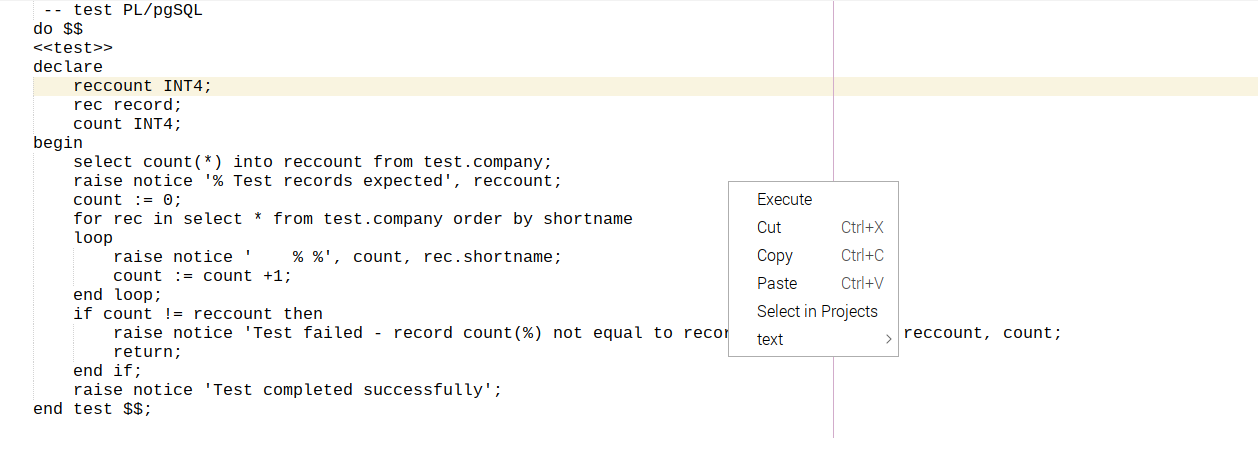
However if the files do not exist within a PostgreSQL project they will not be actioned. A database context is needed to execute a command, which is defined in the postgresql.properties file.

The output and error streams from the execution of the PSQL program, are routed to the NetBeans Output Window.
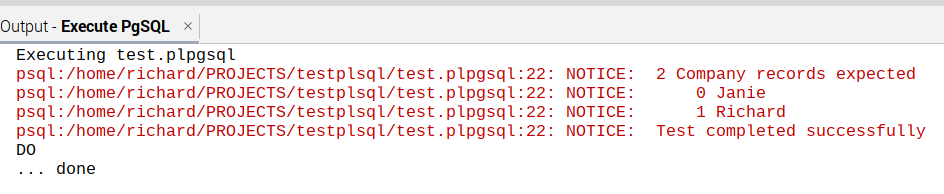
Using the PostgreSQL NBM
Adding the NBM to NetBeans
To be able to use the Plugin it must be downloaded and then installed in NetBeans.
Releases of this product are stored in a Maven repository on GitHub. It is possible to download an NBM from Packages.
Once you have a downloaded copy on your machine, you follow the standard NetBeans process to install the downloaded file (Tools>Plugins).
The ActionsSupport NBM must be installed with or prior to installing this NBM.
Useful Links
-
Releases are stored in a Packages Maven repository on GitHub
-
Source Code is stored in a Git repository on GitHub as part of a monorepro containing NBMs.
-
Documentation can be found on the TRP website.
-
Documentation source is stored in a Git repository on GitHub as part of a monorepro containing documentation.
-
Development Process Guide for The-Retired-Programmer products can be found on the TRP website.